Embed conversational diagram creation inside AI chats
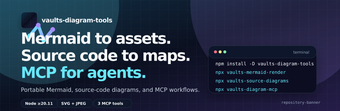
Vaults Diagram Tools, developed by Malnati, is an MCP server that connects AI assistants to diagram creation and editing, designed to convert plain-language prompts into structured visuals. It programmatically generates and modifies Mermaid.js diagrams inside chat environments, renders previews as SVG or PNG, and accepts edits from the assistant. Targeted at developers, architects, and documentation specialists, it keeps diagram authoring inside conversational workflows while reducing manual syntax work.
What can Vaults actually generate from plain text?
Vaults produces diagrams using the Mermaid.js syntax, so it can create flowcharts, sequence diagrams, Gantt charts, class diagrams, state diagrams, ERD, and journey maps. The tool accepts descriptive prompts and returns Mermaid code that represents the requested structure. For users who need specific visual types, Vaults maps plain-English instructions to the corresponding Mermaid constructs, which preserves portability because Mermaid is an industry-supported syntax.
How reliable are the rendered diagrams for documentation?
Vaults renders diagrams into visual formats like SVG and PNG for immediate preview, and provides AI-driven editing so an assistant can modify existing diagrams via natural language. The final correctness depends on the assistant's generated Mermaid code, since the AI produces the syntax. For complex architectures, expect to validate node relationships and labels manually after generation to ensure accurate technical documentation.
What inputs and environment does Vaults require to run?
The tool is a Model Context Protocol server that requires an MCP-compatible client, such as Claude Desktop, and a Node.js environment for server execution. It accepts textual descriptions provided by the connected assistant and outputs rendered files in SVG or PNG. Deployment expects a local or developer-run server process, which aligns the tool with code-centric workflows rather than purely browser-based diagram editors.
Is Vaults a fit for team workflows and contributor roles?
Vaults targets software developers, system architects, technical project managers, and documentation specialists who use AI assistants during design and review. Its zero-UI, AI-called approach keeps creation inside conversations and favors teams comfortable with developer tooling. The project is open-source on the developer's repository, which suits teams that prefer inspectable code and integration options rather than a graphical drag-and-drop editor for non-technical contributors.
Practical choice for technically minded teams that rely on AI-guided diagrams
Vaults is a practical option for technical teams who want to generate and iterate diagrams inside an AI chat workflow; it assumes familiarity with developer tooling and a willingness to review generated syntax. For best results, write explicit, stepwise descriptions so the assistant produces precise Mermaid code, and treat each generated diagram as a draft that benefits from a quick human check.
Pros
Converts plain-English instructions into Mermaid.js diagram code
Renders previews to SVG or PNG for immediate visual checks
Supports many diagram types including ERD and Gantt charts
Cons
Requires an MCP-compatible client and a Node.js environment
Generated diagrams depend on assistant-produced Mermaid syntax
Geared toward technical users rather than non-technical editors
Laws concerning the use of this software vary from country to country. We do not encourage or condone the use of this program if it is in violation of these laws. Softonic may receive a referral fee if you click or buy any of the products featured here.